Pushing Live Updates Through Plain HTTP
July 20, 2026 · 04:40 UTC
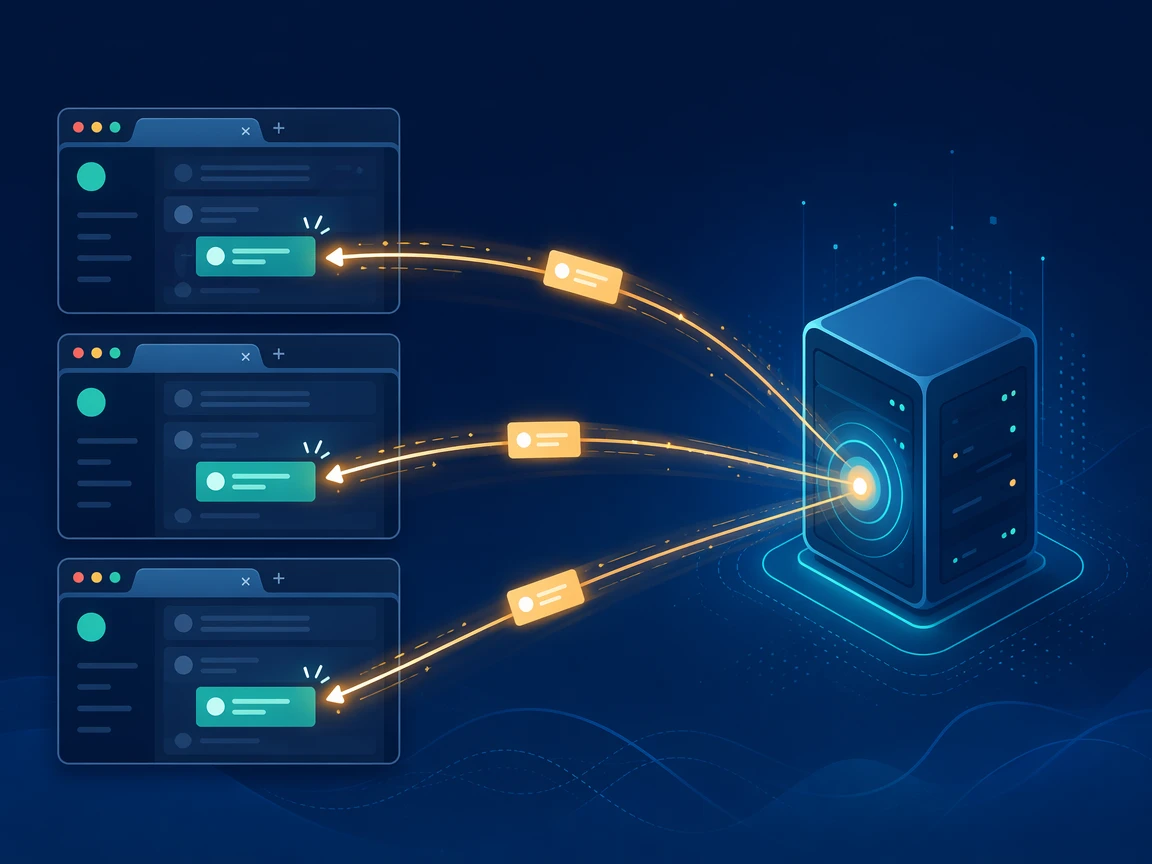
Holding a request open sounds wasteful until it becomes the trick that lets a server push data to a browser the exact moment that data exists, with no socket in play and no clock ticking away that keeps asking again and again for nothing at all.
Long-polling takes an ordinary HTTP request and refuses to answer it straight away, so the connection waits on the server until fresh data shows up or a timer runs out, and only then does the reply come back, which quietly turns a plain request into a channel that the server can speak through whenever it happens to have something that is worth sending down the wire.
This approach powered realtime collaboration long before sockets ever grew reliable, and it still earns a spot today because it rides on plain HTTP that slips past the old proxies and strict firewalls where a raw socket connection quietly fails.
Everything below fits in three small files, a server with zero dependencies, one HTML page, and one short client script to run it.
How the Wait Works
A browser opens a request to the channel and the server parks it, so the response stays unfinished while it waits in a queue.
When someone sends a message, the server wakes every parked request at once and answers each one with the new data, so a browser sees that update the instant it happens rather than on the next check that a polling loop would sit and wait around for.
Right after the browser reads that answer, it opens one fresh request, so the open channel stays alive across the whole session.
Serving the Channel
Memory holds the whole state here, one list for the requests that are parked and waiting on new data, and one message log so a client that joins late can still catch up on everything it missed while it was away from the open page just a moment ago.
Handling the load takes three routes, one holds the long-poll open, one accepts a message and shares it, one serves the files.
// server.js, run with: node server.js
const fs = require('fs')
const http = require('http')
const path = require('path')

// Requests parked and waiting for the next message
const waiting = []
// Message log so a late client can catch up
const history = []

// Store one message, then answer every parked request
function pushToAll(message) {
  history.push(message)
  while (waiting.length) {
    const client = waiting.shift()
    send(client.res, 200, { messages: [message] })
  }
}

// Reply with JSON
function send(res, code, payload) {
  res.writeHead(code, { 'Content-Type': 'application/json' })
  res.end(JSON.stringify(payload))
}

const server = http.createServer((req, res) => {
  const url = new URL(req.url, `http://${req.headers.host}`)

  // Route 1, hold the request open until a message exists
  if (url.pathname === '/channel') {
    const since = Number(url.searchParams.get('since') || 0)
    if (since < history.length) {
      return send(res, 200, { messages: history.slice(since) })
    }
    const client = { res }
    waiting.push(client)
    // Answer empty after a while so the browser reconnects
    const timer = setTimeout(() => {
      const index = waiting.indexOf(client)
      if (index !== -1) {
        waiting.splice(index, 1)
      }
      send(res, 200, { messages: [] })
    }, 25000)
    req.on('close', () => {
      clearTimeout(timer)
      const index = waiting.indexOf(client)
      if (index !== -1) {
        waiting.splice(index, 1)
      }
    })
    return
  }

  // Route 2, take a message and broadcast it to everyone
  if (url.pathname === '/send' && req.method === 'POST') {
    let body = ''
    req.on('data', (chunk) => (body += chunk))
    req.on('end', () => {
      let text = ''
      try {
        text = JSON.parse(body).text || ''
      } catch (parseError) {
        // Ignore a malformed body and treat the text as empty
      }
      if (text) {
        pushToAll({ id: history.length + 1, text, time: Date.now() })
      }
      send(res, 200, { ok: true })
    })
    return
  }

  // Route 3, serve the static files
  const file = url.pathname === '/' ? '/index.html' : url.pathname
  fs.readFile(path.join(__dirname, file), (readError, data) => {
    if (readError) {
      res.writeHead(404)
      return res.end('Not found')
    }
    const type = file.endsWith('.js') ? 'text/javascript' : 'text/html'
    res.writeHead(200, { 'Content-Type': type })
    res.end(data)
  })
})

server.listen(3000, () => {
  console.log('Demo running at http://localhost:3000')
})
Passing the since number carries the count of messages a client already holds, so a request asks only for what is newer than that, and a client that just arrived sends a plain zero and gets the full message log handed back to it in a single shot.
Wiring the Page
Markup stays plain on purpose, a status line, a text input, a send button, and a list where each new message lands on arrival.
<!DOCTYPE html>
<html lang="en">
  <head>
    <meta charset="UTF-8" />
    <title>Long-Poll Channel Demo</title>
  </head>
  <body>
    <h1>Long-Poll Channel Demo</h1>
    <p>Open this page in two tabs. Messages appear instantly in both.</p>
    <p>Status: <span id="status">connecting...</span></p>
    <input id="text" type="text" placeholder="Type a message..." autocomplete="off" />
    <button id="send">Send</button>
    <ul id="log"></ul>
    <script src="script.js"></script>
  </body>
</html>
Driving the Client
Client code runs one loop, it asks the channel for anything newer than what it already holds, waits on that request until the server answers, draws whatever comes back on the page, then turns around and asks again straight away without any pause.
Sending a message is a separate call that posts the text and returns fast, since it reaches every tab through the channel loop.
// script.js
const statusEl = document.getElementById('status')
const logEl = document.getElementById('log')
const textEl = document.getElementById('text')
const sendBtn = document.getElementById('send')

// Count of messages already shown, so we ask only for newer ones
let since = 0

function addLog(message) {
  const item = document.createElement('li')
  const time = new Date(message.time).toLocaleTimeString()
  item.textContent = `[${time}] ${message.text}`
  logEl.appendChild(item)
}

// Ask the channel, wait for data, render it, then ask again
async function poll() {
  try {
    statusEl.textContent = 'connected (waiting for data...)'
    const response = await fetch('/channel?since=' + since)
    const data = await response.json()
    for (const message of data.messages) {
      addLog(message)
      since = message.id
    }
  } catch (error) {
    statusEl.textContent = 'disconnected, retrying...'
    await new Promise((resolve) => setTimeout(resolve, 1000))
  }
  poll()
}

// Post a message, the channel loop delivers it to every tab
async function sendMessage() {
  const text = textEl.value.trim()
  if (!text) {
    return
  }
  textEl.value = ''
  await fetch('/send', {
    method: 'POST',
    headers: { 'Content-Type': 'application/json' },
    body: JSON.stringify({ text })
  })
}

sendBtn.addEventListener('click', sendMessage)
textEl.addEventListener('keydown', (event) => {
  if (event.key === 'Enter') {
    sendMessage()
  }
})

poll()
Running the Demo
Save the three files in one folder, start the server with node server.js on the command line, then open localhost:3000 in two browser tabs placed side by side to watch the effect, since a single tab shows the messages fine yet the second tab is really what makes the instant delivery obvious the very moment that a line gets sent across from the other one sitting next to it.
Type in one tab and the text lands in both within a blink, because the send call wakes the parked request that each tab is holding open, so every waiting tab then draws the new line onto its list and quietly reopens its channel for the next one.
Nothing here polls on a fixed timer, and that is the entire point of the design, since the browser waits on an open line instead.
Where the Timer Fits
Any parked request cannot wait forever, because a proxy or a mobile network may cut a silent connection, so the server answers with an empty result after twenty five seconds and the client simply turns around and opens a brand new request in place.
Such a short cycle looks like a plain run of quick requests to anything sitting between the browser and the server, which is the exact reason it survives the middleboxes that would tear a long lived socket connection right down without any warning.
Placing It Next to SSE and Sockets
Comparing the three realtime options side by side clears a common mix-up, since long-poll sits closest to server-sent events on transport while it lands closest to a socket on the two-way result, and that split points to the right pick for a network.
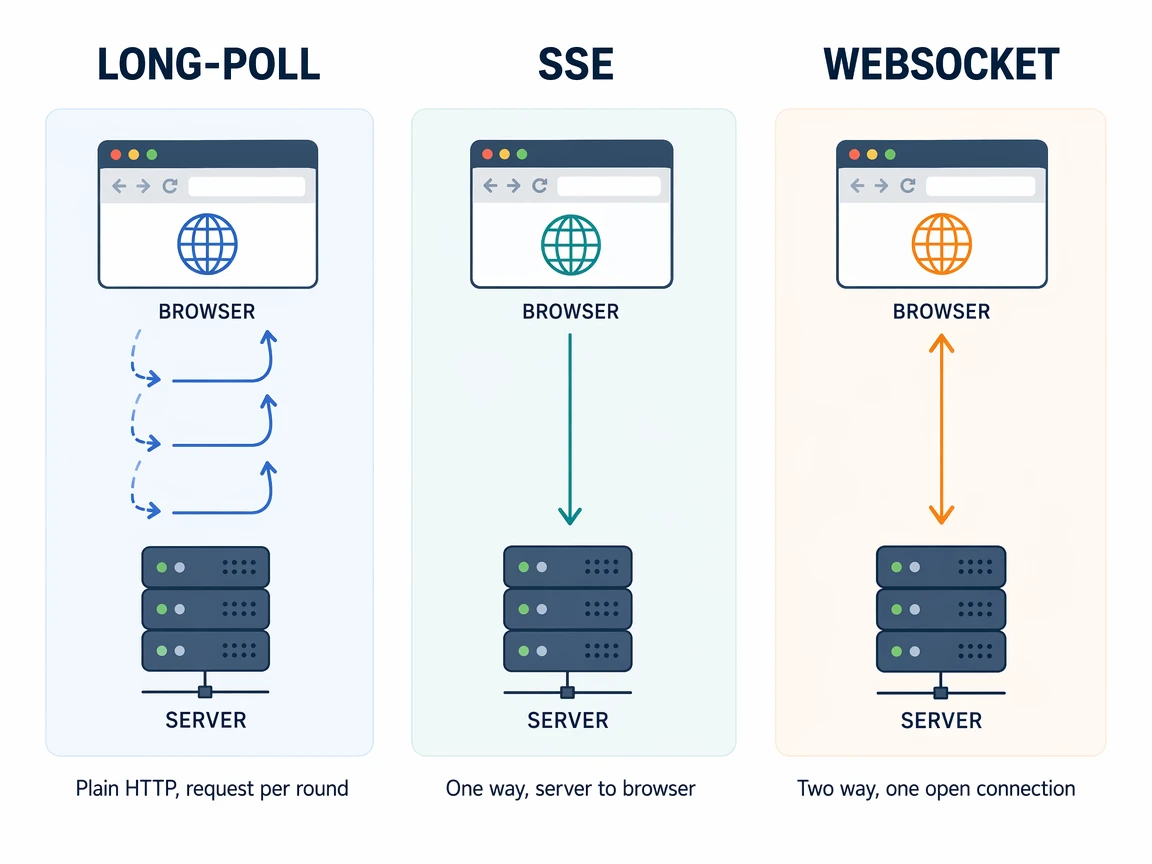
| Trait | Long-Poll | Server-Sent Events | WebSocket |
|---|---|---|---|
| Transport | Plain HTTP | Plain HTTP | Upgraded protocol |
| Direction | Two-way, faked with two calls | One-way, server to client | Two-way, native |
| Connection | A request per round | One held request | One kept open |
| Passes old proxies | Yes | Yes | Often blocked |
| Server memory | Track parked requests | Track open streams | Track live connections |
Events from a server-sent stream all share the very same base as the demo here, a plain HTTP request left open while the server writes to it, so both slip past the middleboxes that a socket cannot cross, though these events run a single way only.
Sockets take the other road, since one connection stays open for messages in both directions with low overhead per message, which fits a busy stream such as a game or cursor, yet that upgraded connection is the thing an old proxy tears down on sight.
Long-poll fakes two directions with two separate calls, a parked request for data coming down and a normal post for data going up.
Facing the Broadcast Channel
Watching a message reach both tabs at the same moment raises a fair question, because the browser already ships a Broadcast Channel API that hands one message to every tab on the same origin. The demo here still needs more than that, because it moves a message across separate browsers on separate machines, and a broadcast channel only reaches tabs inside one browser.
Opening a broadcast channel fits when a message never leaves the machine, because it links only tabs, frames, and workers that share the same origin. A login in one tab then logs the rest in, and a logout clears every open page at the same time.
Crossing to another device is where a broadcast channel stops, because it stays locked inside its own origin far from any request.
| Trait | Long-Poll | Broadcast Channel |
|---|---|---|
| Reaches | Any client, any device | Tabs on one browser only |
| Needs a server | Yes, holds and fans messages | No, runs in the browser |
| Crosses origin | Yes, over plain HTTP | No, same origin only |
| Best fit | Realtime across users | Sync tabs on one machine |
Blending the two is the natural move on a real page, since a long-poll loop pulls fresh data from the server while a broadcast channel mirrors it into every other tab, so many open tabs can lean on a single held request instead of a whole stack.
Choosing the Right One
Reaching for server-sent events makes sense when traffic runs one way, a live feed, a price ticker, or a notification stream.
Picking a socket pays off when both sides talk often and latency truly counts, a chat with typing signals, a shared editor, or a multiplayer scene, because one open line carries dense two-way traffic cheaper than reopening a request on each round.
Falling back to long-poll fits the case where a socket cannot connect at all, a locked corporate proxy, a captive portal, or an old browser, so it works as the transport that trades raw speed for reach and gets through where the other two stall.
What This Buys
Reach is the real gain here, since a transport built on ordinary HTTP requests works in the places where a socket handshake never completes, from an old corporate proxy to a captive network that only forwards the plain traffic to the outside world.
Simplicity rides along with it, since the server holds a list and answers it while the client asks and reasks over and again.
Cost is the honest tradeoff on this path, since a socket carries many messages over one long connection while this design reopens a request on every single round, so a busy stream pays more overhead here, which is the plain reason a modern stack reaches for a socket first and then keeps long-poll parked as the fallback path that always gets through in the very end.